App de escritorio · 100% offlineDesktop app · 100% offline
CUIX Maker Pro
Crea y edita ribbons de AutoCAD visualmente: arrastra comandos, LISP y DLLs, asigna iconos, y exporta un instalador .exe de un clic. Lee y escribe el formato real de AutoCAD.Build and edit AutoCAD ribbons visually: drag commands, LISP and DLLs, assign icons, and export a one-click .exe installer. Reads and writes the real AutoCAD format.
✓$50 — pago único$50 — one-time·licencia de por vida para esta versión, sin suscripciónlifetime license for this version, no subscription·prueba gratis de 7 días7-day free trial
Requiere Windows 10/11 y AutoCAD 2020 o superior. No hay versión para macOS ni Linux.Requires Windows 10/11 and AutoCAD 2020 or newer. There is no macOS or Linux version.
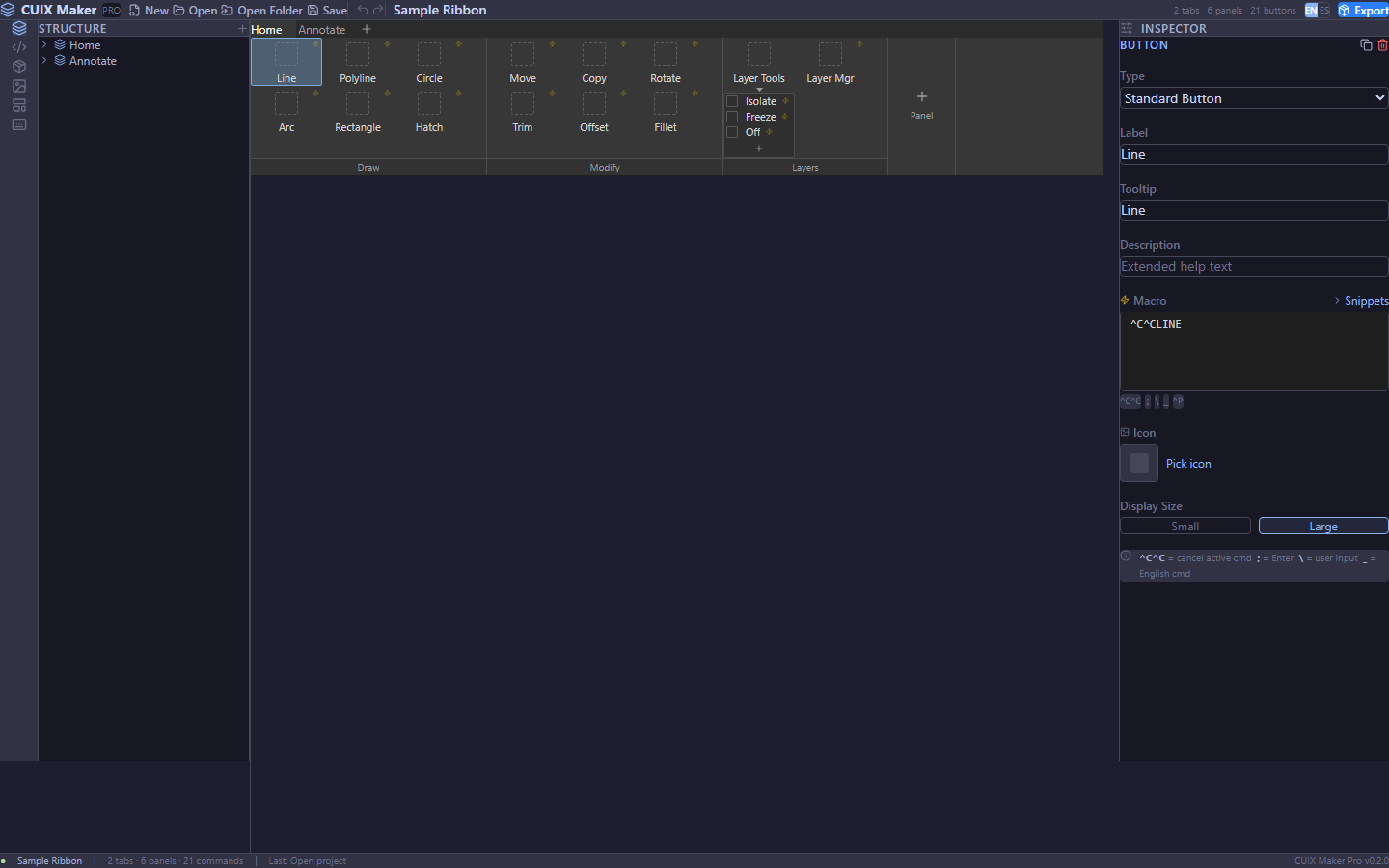
El editor: estructura, lienzo del ribbon e inspector de macros.The editor: structure tree, ribbon canvas and macro inspector.
DemoDemo
Míralo en 30 segundosSee it in 30 seconds
FuncionesFeatures
Todo lo que el editor CUI nativo no te daEverything the native CUI editor doesn't give you
Editor drag & dropDrag & drop editor
Arrastra comandos, reordena botones, mueve paneles y pestañas.Drag commands, reorder buttons, move panels and tabs.
LISP, DLL y ARXLISP, DLL & ARX
Carga .lsp y detecta comandos; arrastra DLL/ARX y genera las macros.Load .lsp and detect commands; drag DLL/ARX to auto-generate macros.
Iconos en botonesButton icons
Importa PNG/BMP/ICO (o desde tu disco) y se empaquetan en el .cuix.Import PNG/BMP/ICO (or from disk); they get packaged into the .cuix.
Editor de macrosMacro code editor
Escribe macros en un editor de código real con resaltado de sintaxis y snippets (^C^C, espacio, salto…). Funciona 100% offline.Write macros in a real code editor with syntax highlighting and snippets (^C^C, space, return…). Works 100% offline.
Lee y escribe el formato real de AutoCADReads & writes the real AutoCAD format
Abre bundles .cuix reales (RibbonRoot/MenuGroup, comandos por ID, imágenes embebidas) y guárdalos en ese formato nativo — el que AutoCAD carga. Los proyectos existentes conservan su estructura; los nuevos se generan en formato real.Open real .cuix bundles (RibbonRoot/MenuGroup, command-by-id, embedded images) and save them in that native format — the one AutoCAD loads. Existing projects keep their structure; new ones are generated in the real format.
Instalador .exe de un clicOne-click .exe installer
Exporta un .exe autoinstalable: el usuario final hace doble clic y se instala en AutoCAD solo.Export a self-installing .exe: the end user double-clicks and it installs into AutoCAD on its own.
Zoom por secciónPer-section zoom
Ctrl + rueda hace zoom independiente en cada panel, con sus scrollbars.Ctrl + wheel zooms each panel independently, with its own scrollbars.
Undo / Redo
Historial de 100 pasos con atajos. Equivócate sin miedo.100-step history with shortcuts. Make mistakes fearlessly.
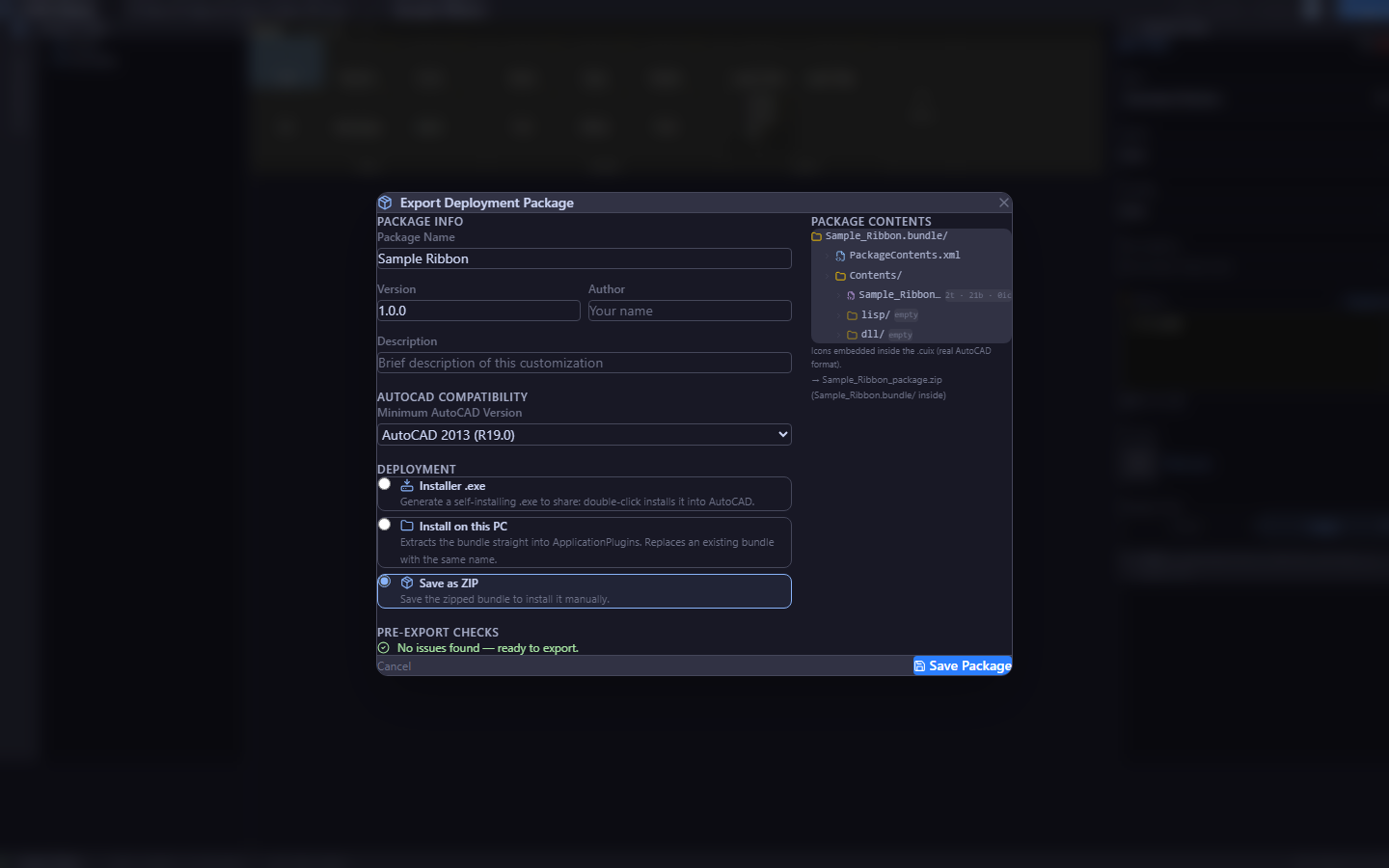
Instalador .exe para compartir, instalar en esta PC, o guardar como ZIP.A shareable .exe installer, install on this PC, or save as a ZIP.
El diálogo de exportación, con los tres modos de despliegue.The export dialog, with its three deployment modes.
Cómo funcionaHow it works
De cero a ribbon en cuatro pasosFrom zero to ribbon in four steps
01
Crea o abreCreate or open
En blanco, con plantilla, o abre un bundle existente.Blank, from a template, or open an existing bundle.
02
Arrastra y sueltaDrag & drop
Comandos, LISP, DLLs e iconos a tus paneles.Commands, LISP, DLLs and icons onto your panels.
03
AjustaFine-tune
Macros, tooltips e iconos en el inspector.Macros, tooltips and icons in the inspector.
04
ExportaExport
Instalador .exe, instala en AutoCAD, o ZIP..exe installer, install in AutoCAD, or ZIP.
Listo para personalizar AutoCADReady to customize AutoCAD
$50, un solo pago · licencia de por vida para esta versión, sin suscripción · prueba gratis de 7 días (la app completa; al terminar, exportar/guardar requiere licencia). Las versiones mayores futuras (v2, v3…) se compran aparte.$50, one-time · lifetime license for this version, no subscription · 7-day free trial (full app; afterwards export/save require a license). Future major versions (v2, v3…) are sold separately.
CUIX Maker Pro es un proyecto independiente, no afiliado a Autodesk, Inc. AutoCAD®, AutoLISP® y CUIX son marcas de Autodesk, Inc.CUIX Maker Pro is an independent project, not affiliated with Autodesk, Inc. AutoCAD®, AutoLISP® and CUIX are trademarks of Autodesk, Inc.